How to Remove Duplicate MP3 Files
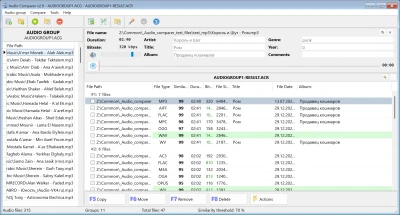
MP3 libraries attract duplicates: re-encodes, “(1)” copies, phone syncs, and old torrent folders. A filename search misses MP3 clones — same audio, different path. This guide shows how to remove duplicate MP3 files reliably.
- 128 vs 320 kbps of one song
- Same rip saved in “Downloads” and “Music”
- Untagged
track.mp3matching a tagged copy - MP3 export next to an older WMA/FLAC original
Why MP3 tag tools are not enough
Tag editors and “find by artist+title” miss empty tags, typos, and “Track 07” naming. Bitrate in the header does not prove two files are different recordings — only listening (or fingerprinting) does.
Step-by-step MP3 cleanup
- Add folders (Downloads, Music, external drives).
- Run comparison — about 10–12 songs per second on modern multi-core hardware.
- Open each group; use the player to confirm they match.
- Keep higher bitrate unless file is corrupt; delete or move the rest.
Hidden clones across drives
Clones often sit on an external backup while the “main” copy lives on SSD. Audio Comparer compares across all scanned locations in one job — no need to normalize filenames first.
Large collection? Read clean a 10,000+ song library.
Clean duplicate MP3s now
Scan mixed folders — clones surface even with wrong tags.
Download Free Trial✅ 30-day free trial | ✅ No file damage | ✅ Works on Windows
What Our Users Say
Fixed my messy library
"I was frustrated with seeing the same songs multiple times in different folders. I tried cleaning it manually, but it was a mess. Audio Comparer scanned my entire collection and removed duplicates while keeping the best copies. Exactly what I needed."
— Ivan OrtizRating: 5/5 ·