 Audio Comparer
Compare Two Audio Files Side by Side
Sometimes you do not need to scan a whole library. You have two files and one question: is this the same recording, or only a similar one? File size will not answer it, tags will not answer it, and listening to both in turn is slow and unreliable — human memory for sound is short.
What a visual audio comparison shows you
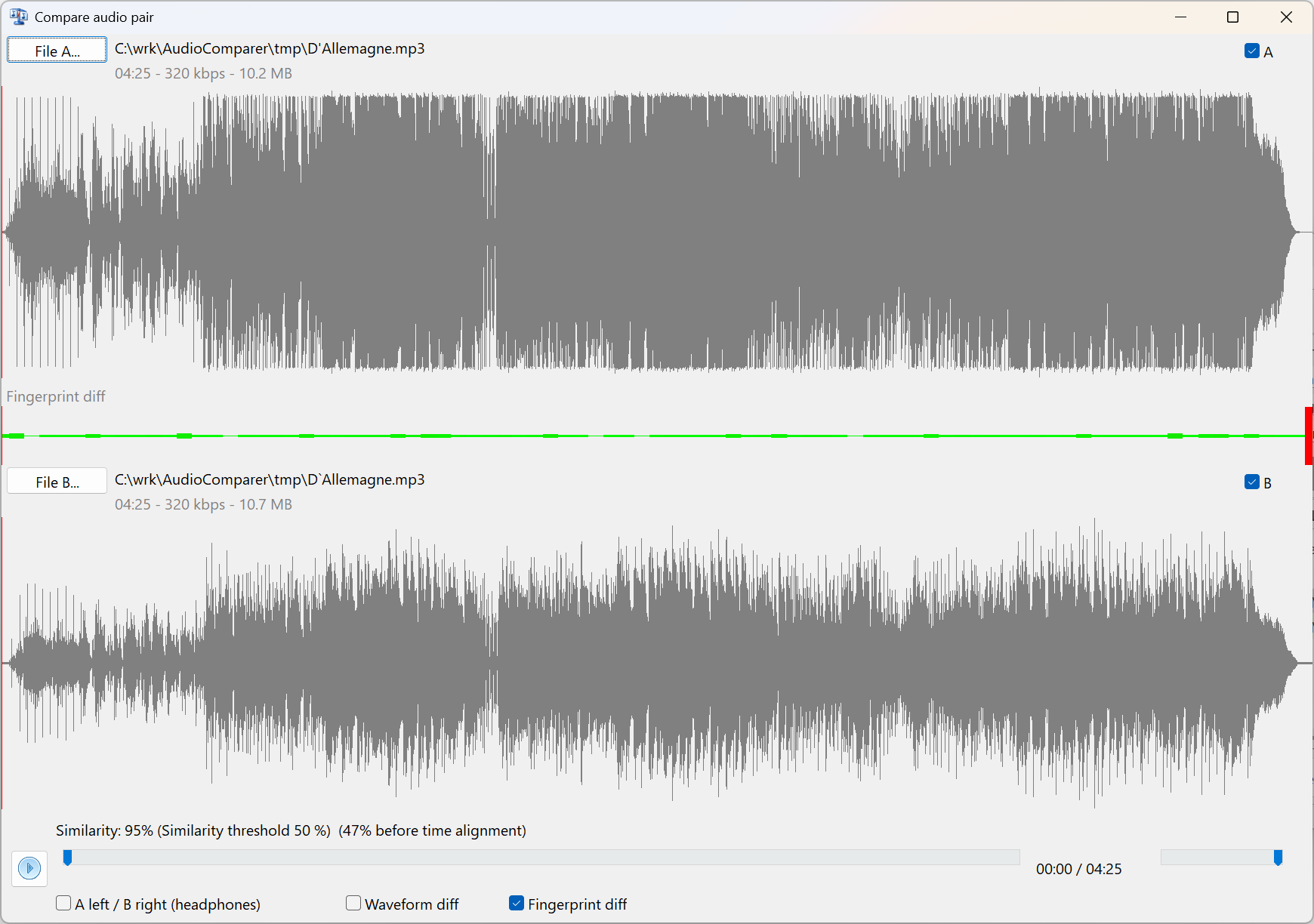
Two copies of the same track opened side by side in Audio Comparer.
Everything in that window answers a different part of the question:
- Both file paths with duration, bitrate and size — the basic facts, next to each other instead of in two Explorer windows.
- Two waveforms. Each one is scaled to its own peak, so what you compare is the shape of the music: where it is loud, where it breathes, where it fades.
- The fingerprint difference strip between them. Green means those seconds match, red means they do not. One glance tells you whether the files differ everywhere or only in one spot.
- The similarity score, next to the threshold currently used for comparisons.
- Synchronized playback. Both files play at the same position at once. There is also a headphone mode that sends file A to the left ear and file B to the right — the fastest way to hear a difference that no number describes well.
What the example above demonstrates
Both files run 4:25 at 320 kbps. The sizes differ slightly — 10.2 against 10.7 MB — which by itself proves nothing.
The waveforms tell you more. The upper one is a dense, almost solid block: loud, heavily compressed dynamics. The lower one breathes, with visible peaks and dips. Same performance, different mastering — and that is something you can see in a second and would need a careful listen to notice.
The strip between them is green nearly end to end, with red only at the very tail where one copy runs slightly longer. And the score reads 95% — but with a note that before time alignment the same pair scored only 47%.
Why finding time-shifted copies matters
That gap between 47% and 95% is the whole point.
Two copies of one recording rarely start at exactly the same instant. Every re-encode to MP3 adds encoder delay and padding. A track ripped from a CD, downloaded from a store, recorded from a stream, or converted between formats can easily end up shifted by a fraction of a second against its twin. The audio is the same; the alignment is not.
For a duplicate finder that is fatal. Compare the two files from position zero and every feature lands next to the wrong neighbour — the pair scores like two unrelated songs and quietly stays in your library. And those are exactly the copies you most want to find, because they really are the same recording, not a cover or a live version.
Audio Comparer looks for the best alignment between two tracks before scoring them. That is why this pair goes from "clearly different" to 95%.
Who needs this
- Collectors merging archives from several disks, where the same album arrived three times by three different routes.
- DJs and podcasters checking whether two files in a set are really the same edit.
- Anyone verifying a master — comparing a re-encode, a normalized copy or a restored file against the original.
- Anyone who has already cleaned a library and suspects that something was missed. Usually it was.
How to compare two files in Audio Comparer
- Open Tools → Compare pair visually…, or right-click a pair in the comparison results.
- Use File A… and File B… to pick any two files on disk.
- Read the similarity score and check the difference strip for where the recordings part ways.
- Press play to hear both in sync, or switch on the headphone mode to hear A and B in separate ears.
- Press Esc to close the window.
Related: how audio fingerprinting finds duplicates across a whole library.
See what your ears would miss
Download the trial and compare any two tracks — waveform, score and synchronized playback.
Download Free Trial✅ 30-day free trial | ✅ No file damage | ✅ Works on Windows
What Our Users Say
Cleans up any audio library
"My music folder was a jungle of duplicates in different formats — MP3, FLAC, AAC. Audio Comparer sorted it all out in one scan. The interface is clean, and the preview feature lets you choose which files to keep. A great tool for anyone serious about their music."
— Jon SebastianRating: 4.8/5 ·