 Audio Scanner
Find Any Audio Clip Inside Hours-Long Recordings — Without Uploading Anything
Audio Scanner answers one question: where exactly does this sound play inside that long recording? Give it short clips — jingles, ad spots, a piece of music, any sound — and long recordings. It returns every occurrence with an exact timestamp and counts the plays of each clip, like text search, but for sound.
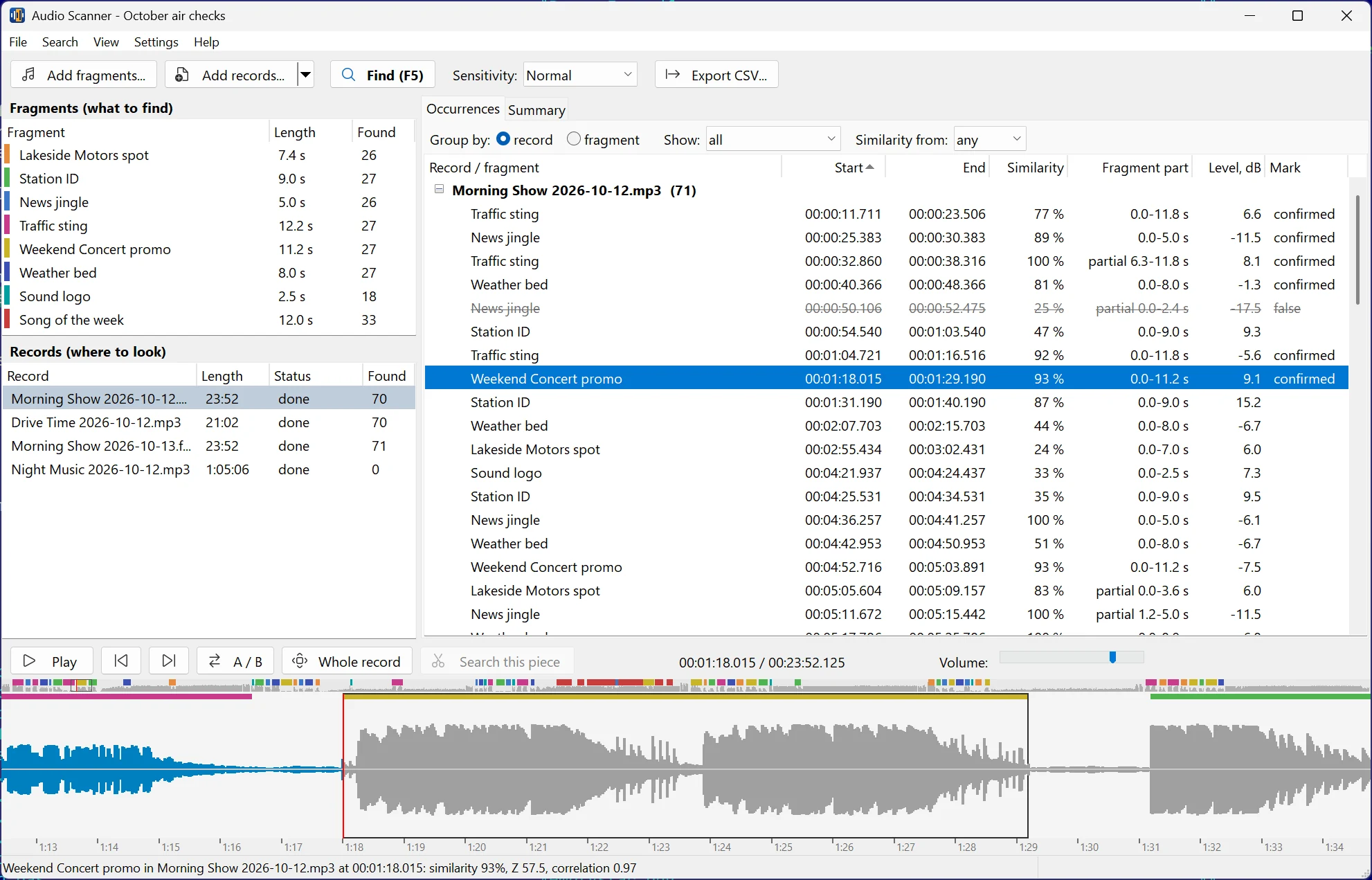
Eight station spots found in two and a half hours of air checks: every play with its time, similarity and waveform
What it does
- Many clips, many recordings, one pass — add your spots and a whole folder of recordings, press Find
- Exact position of every play: start and end time to the millisecond, similarity in percent, signal level
- Finds the clip even when it is quieter, louder, cut off, mixed under a voice-over or music — and shows which part of the clip actually played
- Play counts per clip and per recording in a summary table with totals
- Real air time of every play — the start of the recording is read from the file name of your logger (2026-10-20_14-00.mp3 and the like), from the file date or set by hand
- Proof-of-play report — a ready-to-send HTML report: what was searched and where, the play count table, every play with its time
- Listen to check: the waveform with marks of all finds, playback from any occurrence, A/B switch between the original clip and the find
- Mark finds as confirmed or false, filter by similarity, export to CSV
- Change the sensitivity on the fly — no re-scan; near misses below the threshold stay visible as possible, so a "not found" is never a guess
- Markers for your editor — Audacity labels, cue sheets and Adobe Audition markers of all finds in a recording, or save a find as WAV
- Repeat searches in seconds — fingerprints of scanned recordings are cached, so a new spot is checked against a whole archive without decoding it again
- Command line for schedulers: a daily proof-of-play report without opening the window
- Works across formats and bitrates — MP3, WAV, FLAC, AAC/M4A, OGG, Opus, WMA, APE and more, matched by sound, not by bytes
- Phone-band mode for call recordings (8 kHz, narrowband)
Play counts at a glance
The Summary tab counts how many times each spot played in each recording. Did the client's ad air nine times this morning, as booked? One look answers that.

Fast on very long recordings
Audio Scanner reads the recording once and checks all clips at the same time, using all processor cores. A 24-hour MP3 recording checked for 50 spots takes about a minute on an ordinary 4-core PC. Memory use stays under 200 MB and does not grow with the length of the recording — a full day of broadcast or a 4 GB WAV file is fine. Recordings that were scanned once are remembered: the next search through the same archive with new spots skips the decoding and takes seconds.
🔒 Private by design — nothing leaves your computer
Online audio recognition services make you upload your recordings to someone else's server. That is slow for multi-hour files — and often simply not allowed: pre-release ads, court evidence, unaired programs, confidential calls and interviews.
Audio Scanner processes everything locally, on your own Windows PC. No account, no subscription, no internet connection required for scanning. Your audio never touches the cloud.
The only exception is yours to make: if a spot is missed or found wrongly, you can send us that case to improve the search. The window lists exactly what goes out — the clip and a 30-second piece of the recording around the place — and nothing is sent until you agree.
Who is it for?
- 📻 Radio stations & advertisers — verify that every paid spot actually aired: get the play count and timestamps from your own air-check recordings
- 🎙️ Podcasters & editors — locate intros, sponsor reads, and repeated segments across episodes for cutting or replacement
- 📞 Call centers & banks — check that mandatory announcements and disclaimers were actually played in call recordings, without sending the calls outside
- ⚖️ Legal & compliance — find a specific fragment in recorded evidence without sending confidential audio to third parties
- 🗄️ Archivists & researchers — search large audio archives for a known excerpt
- 🎧 Musicians & rights holders — check where your sample, track, or sound appears in long recordings
How it works
- Add fragments — the clips you are looking for. Drop files onto the window or pick them; a set of clips can be saved and reused.
- Add records — where to look: files or whole folders with subfolders.
- Press Find. Audio Scanner compares acoustic fingerprints — the same class of technology that powers our Audio Comparer — and lists the finds as they come.
- Check and export. Click a find to see it on the waveform and hear it, confirm or reject it, then save the HTML report, export the list to CSV or the markers for your editor. Save everything as a project and come back later.
Step-by-step guides: how to find where an audio clip plays in a long recording, how to count the plays of a jingle or ad in an air check, how to make a proof-of-play report for radio ads.
Free version and license
Download Audio Scanner for free: it finds, shows and plays all occurrences, with no time limit. A license ($59.95, one-time payment) unlocks the HTML report, export to CSV and editor markers, copying the results and the command line, and removes the reminder screen. No subscription.
Frequently asked questions
How can I find where an audio clip occurs in a long recording?
Add the clip and the recording and press Find. Audio Scanner compares acoustic fingerprints and lists every occurrence with its start and end time — even if the clip is quieter, partially cut off, or has a DJ talking over it.
Does it upload my audio to the cloud?
No. Everything runs on your own PC. Your recordings never leave your computer — there is nothing to upload and no server involved.
Can it count how many times a jingle or ad played in a broadcast?
Yes — that is the core use case. Add the spots and your air-check recordings; the Summary tab shows the play count of every spot in every recording, and the list shows the exact time of each play.
What if the clip is cut short or someone talks over it?
It is still found. A partial play is marked as partial together with the part of the clip that actually sounded, for example "partial 2.1–7.0 s". The similarity percentage tells how close the find is to the original.
Can I get the real air time instead of an offset from the start of the file?
Yes. Audio Scanner reads the start of the recording from its file name — the way air-check loggers name their files, such as 2026-10-20_14-00.mp3 — or from the file date, or you set it by hand. Every play then gets a wall-clock timestamp in the list, in the CSV and in the report.
What if a spot was missed?
Switch the sensitivity to Sensitive — the results update at once, without a new scan, and finds below the current threshold are shown greyed out as possible. If the spot is still not there, click the place on the waveform and choose Report a miss: with your consent the clip and a short piece of the recording go to us, and we tune the search.
Can it run automatically every day?
Yes. The licensed version has a command line: AudioScanner.exe /scan /needles "D:\ads\*.mp3" /in "D:\air\2026-10-20" /html "D:\reports\20.html" searches without opening the window and writes the report, so a scheduler can produce a proof-of-play report for every day of broadcast.
How long can the recordings be?
Any length. A 24-hour recording with 50 spots takes about a minute on a 4-core PC; files larger than 4 GB are supported.
How is this different from Audio Comparer?
Audio Comparer compares whole tracks to find duplicate songs. Audio Scanner searches for a short fragment inside long recordings — a different job, powered by the same offline-first fingerprinting approach.
System requirements
| Windows | 10 or 11 |
| Audio formats | MP3, WAV, AIFF, FLAC, AAC/M4A, ALAC, OGG, Opus, WMA, APE, WavPack, MPC, TTA, AC3, DSD |
| Languages | English, German, French, Spanish, Russian |